Free XLSX · Open in Excel or import into Google Sheets · No email required
A place to put the actual edits.
Work through one creative at a time, then check the revision.
A blank worksheet built around the five steps
Space for what you notice and the specific edit
Review status and a final decision
A filled-in example and instructions
1.
Decide what the creative needs to do.
Choose the main job: explain something, spark interest, or get someone to act. Edit toward that goal.
2.
Make the main point easy to catch.
Someone scrolling should quickly understand what you’re saying. Bring the strongest message forward.
3.
Cut anything that competes with the message.
Remove repeated copy, unnecessary details, and visuals that pull attention away from the point.
4.
Make the words and visuals work together.
Show what the copy is explaining. Use size, color, and placement to guide the eye toward what matters.
5.
Check it where people will actually see it.
View it on your phone. Can you read the text, follow the idea, and understand what to do next?
See how a review turns into edits.
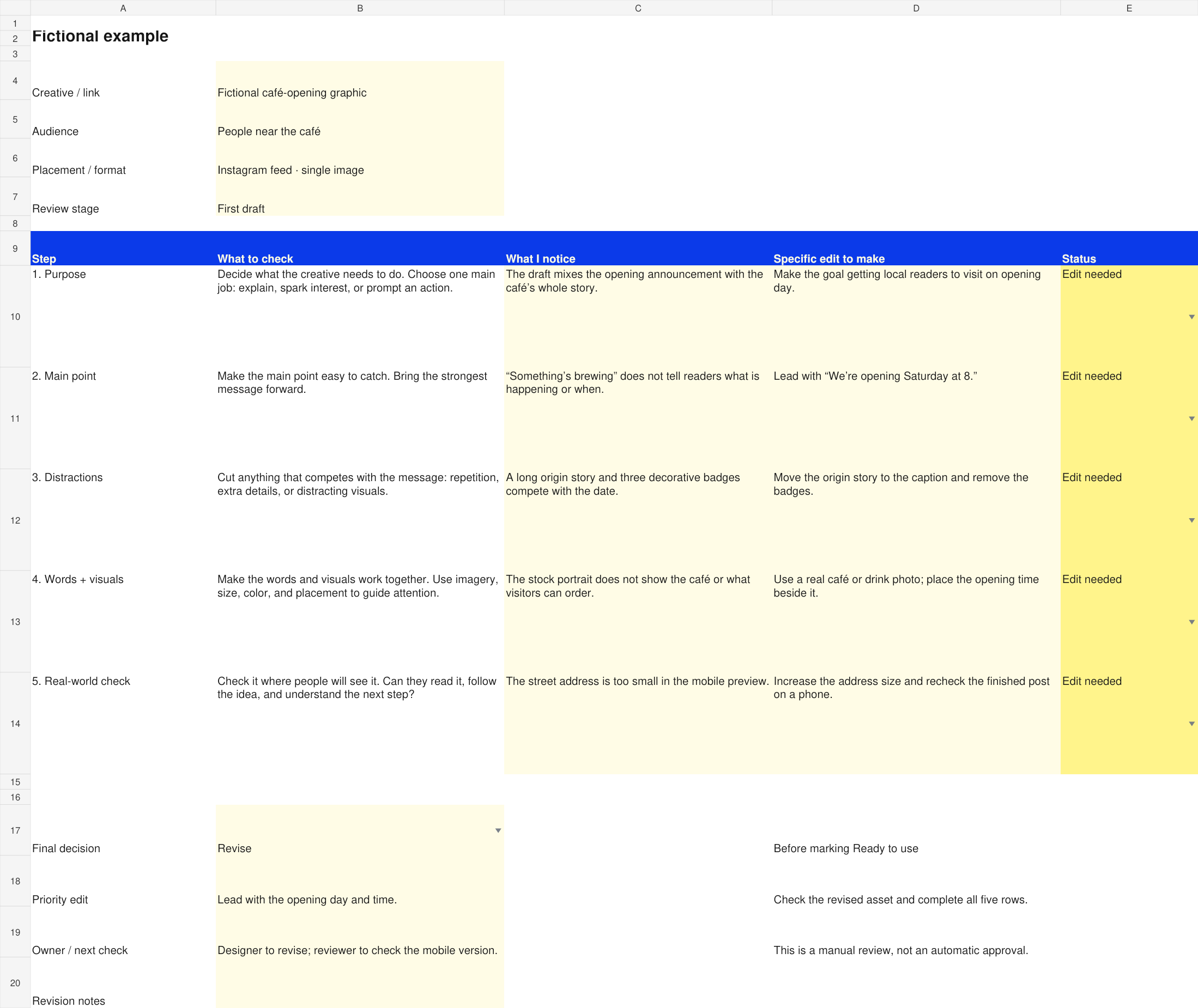
The example uses a fictional café-opening graphic. Each observation leads to a specific change—from clarifying the opening date to making the address readable on a phone.
Fictional worked example. Tap to open at full size.
Try it on your next draft.
Open the workbook, read the example, then use the blank Creative review tab. Duplicate the tab for the next piece.